Artificial intelligence is steadily moving from experimental add-ons to core enablers of digital operations, and Drupal’s latest update reflects that shift with real clarity. In version 1.2, Content Suggestions becomes part of the natural flow of content creation, giving editors and marketers the ability to shape, refine, and elevate their work without ever stepping outside the form they’re already using.
Setup is simple, and once activated, the suggestions surface exactly where they’re needed, reducing friction and helping teams maintain a consistent voice across large and distributed content ecosystems. Field Widget Actions make this feel effortless, guiding editors to refine copy, improve clarity, or expand ideas without interrupting their focus.
For organisations that require more than out-of-the-box intelligence, Drupal’s architecture opens the door to tailored innovation. Custom Content Suggestion plugins let teams encode their expertise, brand standards, and industry nuance into predictable, reusable logic. With the Prompt field element, those plugins can accept structured inputs, helping editors generate content that aligns with strategic goals and remains grounded in the organisation’s own perspective.
What emerges is a more confident and efficient editorial environment, one that supports scale while keeping quality at the centre. Editors gain momentum, technical leaders gain structure, and the business strengthens its ability to deliver clear, consistent, and high-value digital experiences across every touchpoint.
1. Installing and setting up content suggestions
The Content Suggestions feature is part of the Drupal AI module, available as a submodule that brings AI-powered text generation directly into your content editing forms.
Before proceeding, make sure you’re running Drupal AI 1.2 (or later).
Step-by-step setup1. Install the AI module
Use Composer to install the Drupal AI module: composer require drupal/ai
2. Enable the required modules
Enable the main AI module and its Content Suggestions submodule: drush en ai ai_content_suggestions
Alternatively, enable AI Content Suggestions from
Extend → AI.
3. Configure your AI provider
Setting up an AI provider (for example, OpenAI, Azure, or Gemini Provider) is a prerequisite before using Content Suggestions.
Go to:
Configuration → AI → Provider settings
Here, you can:
Once configured, Drupal will be ready to send generation requests to the selected provider.
4. Configure Content Suggestions
After configuring your provider, navigate to:
Configuration → AI → Content Suggestions settings
This is where you manage and customise all available content suggestion types, such as Suggest title, Summarise text, or Suggest taxonomy tags.
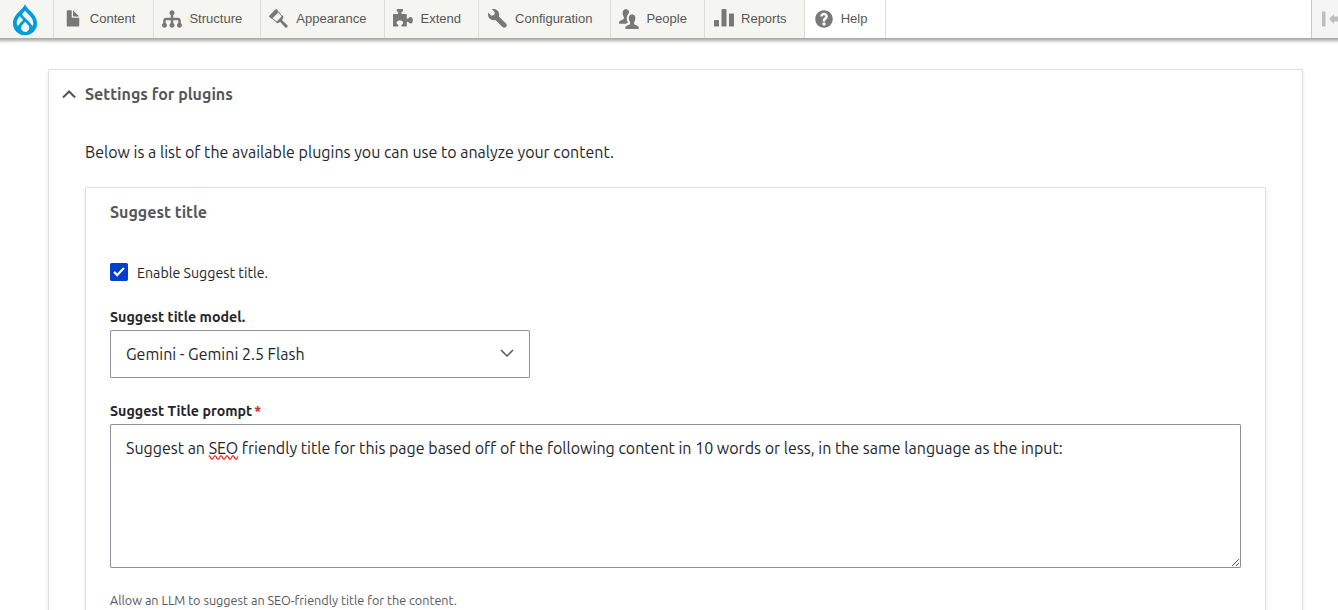
When they click the “Suggest title”, “Suggest body”, or other available suggestion buttons, Drupal will generate AI-powered text based on the defined prompt and display the output below the field.
This allows editors to tailor AI output according to the content structure.

2. Using content suggestions with field widget actions
Normally, content suggestions are generated in a separate interface, requiring you to copy and paste results into the field. That works, but it’s not the most efficient.
This is where Field Widget Actions comes in.
Drupal AI 1.2 solves this with the Field Widget Actions submodule. Once you enable both AI Content Suggestions and Field Widget Actions, a new option appears in the field settings:
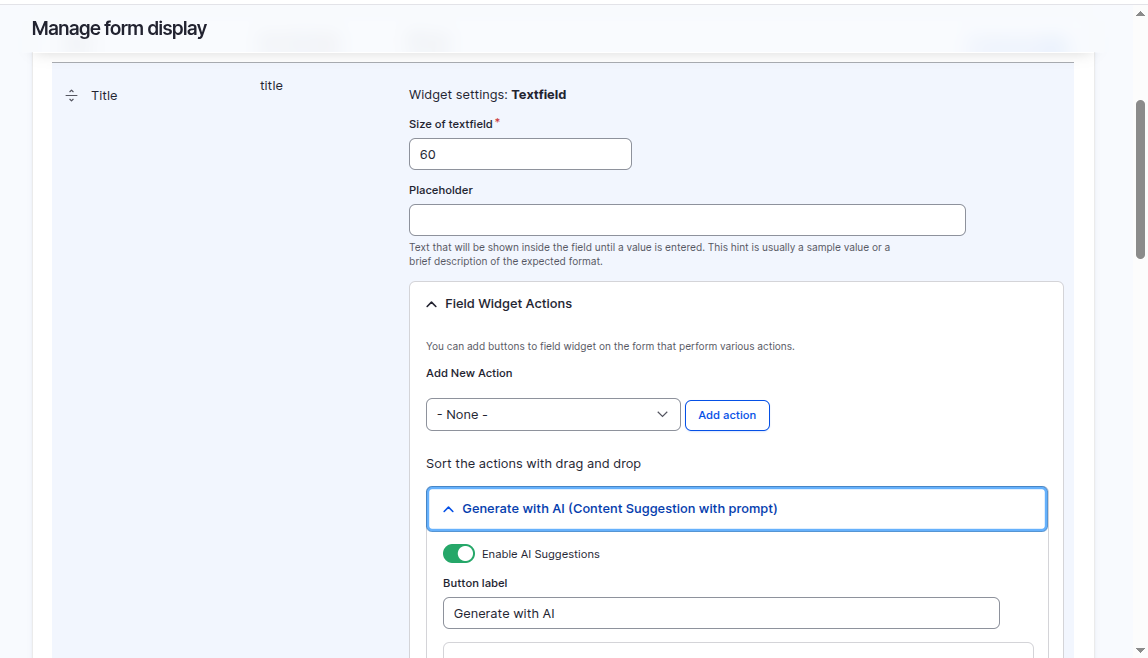
Once enabled, the field displays a button directly next to it (the user can configure the text inside the button, e.g., ‘Generate with AI’). Now, when editors click this button:
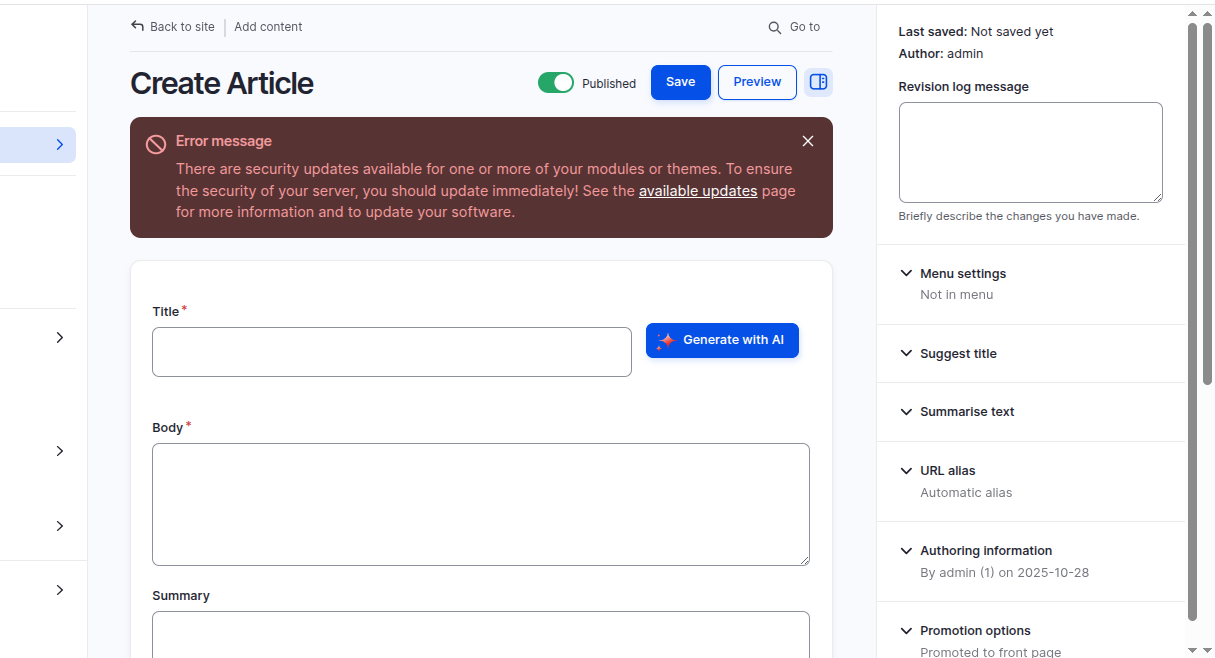

This integration effectively bridges AI-powered content generation with Drupal’s field management system, letting editors focus on crafting content rather than managing it.
3. Creating a custom content suggestion plugin
While Drupal AI offers several built-in content suggestion plugins (like Title or Body generation), sometimes you need something tailored to your editorial or SEO needs.
For example, marketing teams often want to generate SEO-friendly meta descriptions for their pages, something concise, keyword-optimised, and unique to the content.
Let’s create a custom AI Content Suggestion plugin that generates an SEO-friendly description based on the entire page content.
Use case: Suggesting SEO descriptions with AI
The goal is to build a plugin that:
Implementation Steps:
1. Create a plugin class in your custom module, e.g.,
How It Works

4. Using the prompt library in Plugins
Not all prompts should be a plain textarea. Sometimes, you want a more structured and reusable input experience.
Drupal AI 1.2 introduces the Prompt Library, enabling you to define a collection of predefined prompts that can be reused across various fields and plugins. Using the Prompt Field Element, editors can select a prompt from this library or customise it for the field, ensuring consistency and efficiency in AI interactions.
For example, the Suggest taxonomy tag plugin in AI 1.2 leverages the Prompt Library instead of a plain textarea. Editors can keep multiple prompts handy and easily choose one, without manually overriding defaults every time.
Here's a simplified snippet demonstrating the Prompt Field Element:
When used in conjunction with the Prompt Library, this element enhances usability and provides editors with intuitive, structured controls for generating AI-powered content.
Conclusion
The AI Content Suggestions module in Drupal does far more than generate text. It strengthens the entire editorial process by placing intelligence directly inside the tools teams use every day. Getting started is straightforward, and the built-in suggestions offer immediate value for fast, consistent improvements. With Field Widget Actions, editors no longer need to move content back and forth between external tools, allowing AI to write or refine material directly within each field.
For organisations with specialised requirements, custom plugins provide room to encode industry knowledge and brand expectations into repeatable logic. The Prompt field element adds even more precision by introducing structured inputs that guide editors toward results that match strategic goals.
Together, these capabilities give site builders a practical way to support content teams with intelligent assistance at the point of creation. The workflow becomes clearer, the quality becomes more predictable, and teams gain more freedom to focus on ideas rather than mechanics.
The code used in this blog can be found at: Github Link