Getting your website noticed is no small feat, especially when competing with millions of others online. Search Engine Optimization (SEO) is what makes your site easier to find, helping it rank higher in search results and bring in more visitors.
Imagine you're building an online store with Next.js 14+ and TypeScript. You want customers to find your products when they search for them, and you also want your site to load fast and feel smooth.
This is where Next.js and TypeScript come in. With features like server-side rendering (SSR), dynamic routing, and automatic image optimization, Next.js helps you create websites that search engines love.
In this guide, we'll look at practical ways to boost SEO with Next.js and TypeScript. You’ll learn how to use SSR to deliver content faster, manage metadata to improve your page rankings, and optimize images so they load quickly without sacrificing quality. We'll also cover how dynamic routing can make your URLs more user-friendly, which is great for both search engines and visitors.
Whether you’re building a small personal blog or a feature-packed e-commerce site, these techniques will help you create a website that ranks higher, works better, and keeps visitors coming back.
Let’s dive into how you can combine the latest tools and techniques to make your website a success.
What is SEO ?
Search Engine Optimization, or SEO, is about making your website easier for search engines like Google to find and understand.
When your site is optimized for search engines, it has a better chance of showing up higher in search results when people look for topics related to your content. This can help your website attract more visitors, grow its audience, and achieve its purpose.
Think of search engines as librarians for the internet. When someone searches for something, the search engine scans its vast library of websites to find the best matches.
SEO helps your website stand out to these search engines by showing them that your site is trustworthy, relevant, and easy to navigate.
Next.js makes it easier to build SEO-friendly websites by providing tools like:
Setting Up a Next.js App with TypeScript
The initial step is to create a Next.js app configured with TypeScript. You can do this by running the following command:
This will set up a new Next.js project preconfigured for TypeScript. For more details, visit the Next.js documentation.
SEO Friendly URLs
A well-structured website URL hierarchy can benefit our websites ranking. Clean and descriptive URLs improve both user experience and SEO. Next.js enables the creation of dynamic routes, making it simple to build SEO-friendly URLs.
Next.js uses file-system routing built on the concept of pages. When a file is added to the pages directory, it is automatically available as a route. The files and folders inside the pages directory can be used to define most common patterns.
Let’s take a look at a couple of simple URLs :
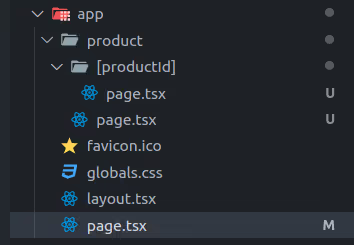
Homepage: https://www.example.com → app/page.tsx
Listings: https://www.example.com/product → app/product/page.tsx
Detail: https://www.example.com/product/1 → app/product/[productId]/page.tsx
Optimizing Images and Multimedia
Image optimization is a fundamental SEO factor. With Next.js, we can use the next/image component to ensure responsive image loading and efficient optimization. Don’t forget to provide descriptive alt attributes for our images to improve accessibility and SEO.
XML Sitemaps
XML sitemaps provide search engines with a map of our website’s structure, making it easier for them to index our content. The next-sitemap package simplifies the generation of XML sitemaps.
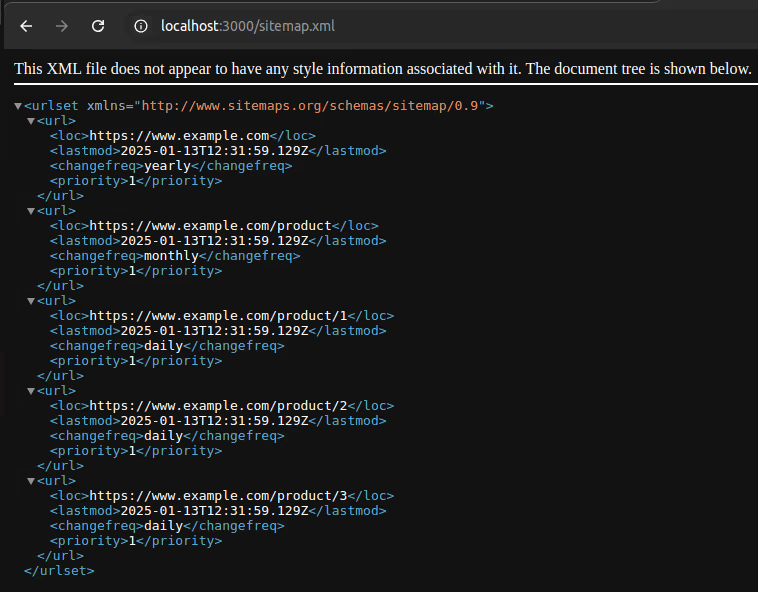
Here’s an example where we generate sitemap entries for a homepage, a product listing page, and individual product pages dynamically fetched from an API:
Define Static URLs
Fetch Dynamic Data
Map Dynamic Data to Sitemap Format
Combine Static and Dynamic Entries
Generated XML Sitemap
Robots.txt
In Next.js, a robots.txt file is used to provide instructions to search engine crawlers (e.g., Googlebot, Bingbot) about which pages or sections of your site should be indexed or ignored. It helps manage search engine visibility for your website.
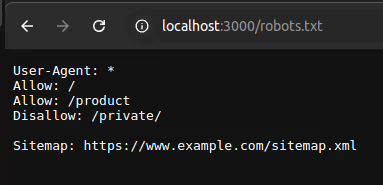
Here’s an example how to configure a robots.txt file in a Next.js app using the MetadataRoute.Robots type provided by Next.js
Generated Robots.txt
SEO Metadata
The Metadata API in Next.js simplifies defining metadata for your application, such as meta tags and link tags, inside the HTML <head> element. This helps improve SEO and makes your pages more shareable on social media platforms.
You can export either:
These exports go in layout.js or page.js files associated with your routes.
Static Metadata
Static metadata in Next.js refers to predefined, unchanging metadata values added to your application for SEO and social sharing purposes. These metadata values, such as titles, descriptions, and Open Graph tags, are set at build time and do not change dynamically based on runtime conditions.
Here’s an example of static metadata defined in a layout file in a Next.js application. It provides default metadata for the pages within the layout, ensuring consistency across the section of the app.
metadataBase
title
keywords
openGraph
Contains metadata used for Open Graph protocol, which enhances link previews on platforms like Facebook and LinkedIn.
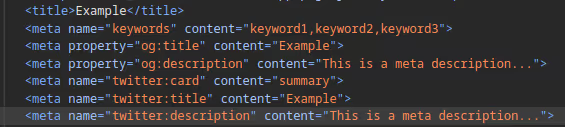
Generated Meta tags in DOM
Dynamic Metadata
Dynamic metadata in Next.js allows you to programmatically generate and customize metadata values based on runtime data, such as page content, user preferences, or external APIs. Unlike static metadata, which is predefined and consistent across pages, dynamic metadata can change depending on the context, providing a more tailored experience for each page.
Dynamic metadata is especially useful for pages that rely on user input or content that changes frequently, such as blog posts, product details, or user profiles.
Here’s an example of dynamic metadata defined in a product file in a Next.js application. It provides dynamic metadata for the product detail pages based on data fetched from API.
Extract Route Parameters: The productId is extracted from params.
Fetch Product Data: Fetches data from API for the product using the productId.
Returns Dynamic Metadata:
If the product is not found (response?.length === 0), a fallback metadata object is returned with a “Not Found” title and description.
If the product is found, metadata is populated using the product data.
Error Handling: If any error occurs during the process, a fallback metadata object is returned.
Conclusion
SEO is essential for making your website visible to the right audience, and with the capabilities of Next.js 14+ and TypeScript, building an SEO-friendly web application has never been more straightforward.
From server-side rendering and static site generation to optimized images, dynamic routes, and detailed metadata management, Next.js provides all the tools you need to create high-performing websites that search engines love.
By combining these features with a thoughtful approach to your website’s structure, content, and accessibility, you can enhance your search engine rankings while delivering a seamless user experience.
Whether you’re crafting a small project or managing a large-scale application, leveraging the power of Next.js and TypeScript ensures your site is ready to meet modern SEO demands effectively.