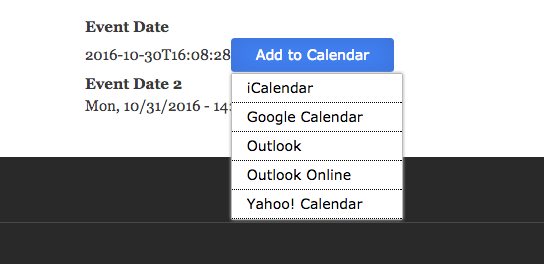
Drupal sites with events functionality, often have to allow their users to export events in their personal calendars. On a recent Drupal 8 project we were asked to integrate 3rd party service Add to Calendar to their events and having found no formal integration of the widget with Drupal we developed and contributed this module. The widget provided by Add to calendar supports export of Dates / events to iCalender, Google Calendar, Outlook, Outlook Online and Yahoo Calendar.
Why use Add To Calendar Service?
How Does Add to Calendar Module Works?
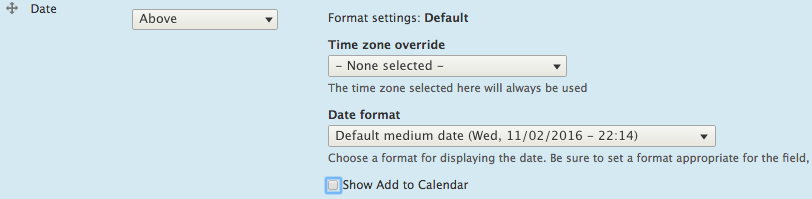
Add to Calendar Module provides third party field formatter settings for DateTime fields. Module internally uses services provided by http://addtocalendar.com to load free add to calendar button for event page on website and email. Clicking on this button, the event is exported to the corresponding website with proper information in the next tab where a user can add the event to their calendar. Besides, it provides a handful of configuration for a really flexible experience, Allowing you to use your datetime format along with Add to Calendar button.
Using Add to Calendar
Developer Support
Devs have the option to add "Add to Calendar" button anywhere on the website by following below steps:
1. Include base library ('addtocalendar/base') for add to calendar basic functionality. Optionally, You may also one of the following style libraries for styling the display button:
$variables['#attached']['library'][] = 'addtocalendar/base';
2. Place event data on the page as:
<span class="addtocalendar atc-style-blue">
<var class="atc_event">
<var class="atc_date_start">2016-05-04 12:00:00</var>
<var class="atc_date_end">2016-05-04 18:00:00</var>
<var class="atc_timezone">Europe/London</var>
<var class="atc_title">Star Wars Day Party</var>
<var class="atc_description">May the force be with you</var>
<var class="atc_location">Tatooine</var>
<var class="atc_organizer">Luke Skywalker</var>
<var class="atc_organizer_email">luke@starwars.com</var>
</var>
</span>
For further customization of this custom button visit: http://addtocalendar.com/ Event Data Options section.
3. This would create "Add to Calendar" button for your website.