The e-commerce wave of conducting business online is growing day by day. And with that, delivering the best user experience is their utmost priority. Our team recently developed a Decoupled e-commerce site - 'Shop the Area' powered by Drupal as its backend and Gatsby as frontend. The website carries several independent boutiques. The user can buy products from the boutiques which are within their 15-mile radius. Since an e-commerce site demands numerous functional and end to end tests, automating this was cumbersome. So, we decided to implement Cypress for automating the testing process for our e-commerce site.
Cypress
Cypress is an end to end JS-based web-testing framework which is an excellent tool for an end to end testing, resulting in easy implementation of Functional test scenarios in websites. Cypress is easy to understand and adopt. It has an awesome GUI, runs on the browser, Automatic waits, fast response, easy debugging etc.
Installing Cypress
I installed Cypress using npm, the npm must be pre-installed in the system. Then, create a project folder, set this folder as the root folder in the terminal and install Cypress using the code given below.
1. Download Cypress
2. Mention base URL pointing at the domain which we are going to test in cypress.json file. Since we are referring to ‘Shop the area’ website, I will enter “https://shopthearea.netlify.app/”. We can also set viewport in which we want to test.
3. So let's try out a simple test script. Create a .js file in the integration folder Write a scenario that needs to be tested.
For example in our site, I create header.js script to check the menu link and their landing page in the header.
Spec file: Header.js
Since I have implemented POM in my tests, I have created a function for pointing on to the menu and a JSON file for storing user data like the URLs for this test.
Let’s import these 2 files in the test file.
POM file: header.js
Data file: header.json
4. Open the GUI through the terminal.
5. Run test
.gif)
Test Organisation
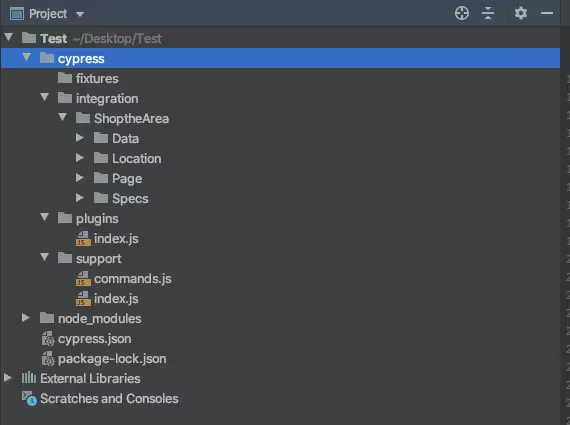
Organising the Test folder is essential for easy maintenance.
To understand the structure to the image below.
Functional testing can be done for the following using Cypress:
Example scripts
Feature: Verify Cart
Test scenarios example:
Since this website has a location feature, the script includes setting location before each test section.
Spec File: Cart.js
POM file:cart.js
.gif)
Feature: Search Functionality
Example Scenarios:
Spec File: search.js
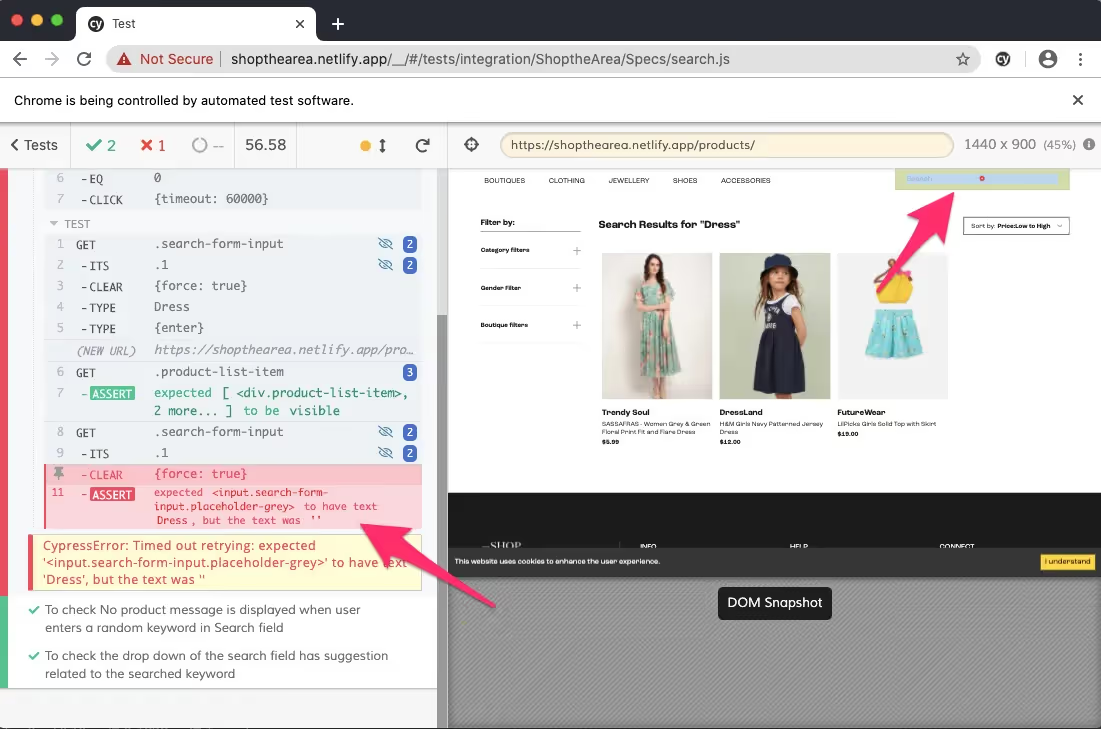
In the first scenario, the search term display in the search field of the result page failed, this is clearly highlighted in the Cypress test runs. This feature is helpful in debugging such issues.
Conclusion
Cypress test runner is fast and easy to write-run end-to-end tests. Cypress has numerous plus points like easy debugging, simple cypress GUI, automatic waits, supports different browsers, saves screenshots and videos, consistent tests, etc. All these features make it a user-friendly testing tool.
Few points to be kept in mind while automating an e-commerce website:
Happy Testing :)