As per the React documentation "Context provides a way to pass data through the component tree without having to pass props down manually at every level.” But, without diving straight into the definition of what Context API is, let’s try to visualize our problem first.
Prerequisite
Basic understanding of stateful functional components in React.
Consider the example explained in the chart below.
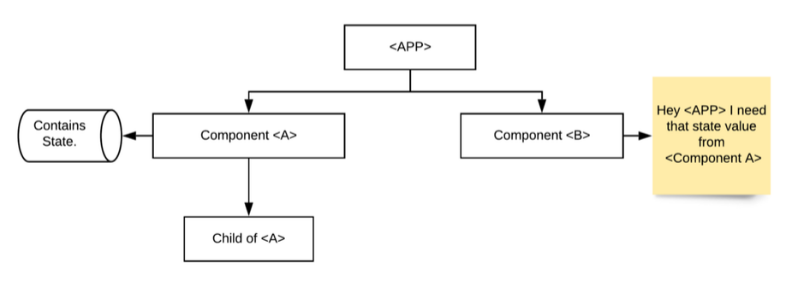
The solution to this problem can be uplifting the state to your Parent APP component. Which will look something like this:
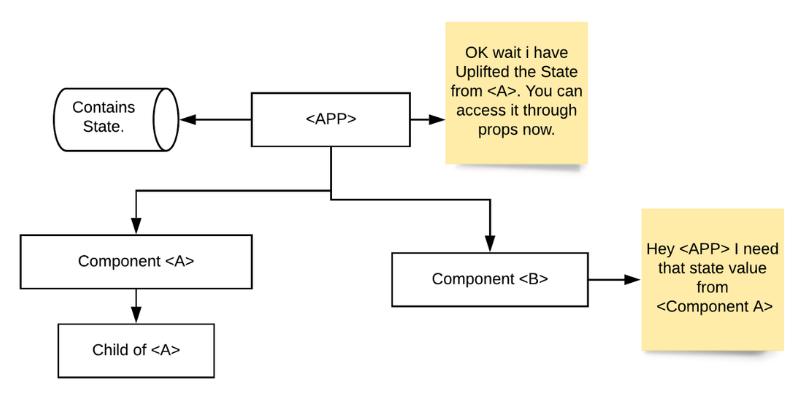
But this is not the ideal solution because as your APP grows larger and larger you can’t keep the state values in your Parent Component. So, what is the solution?
This is where the Context API comes into the picture
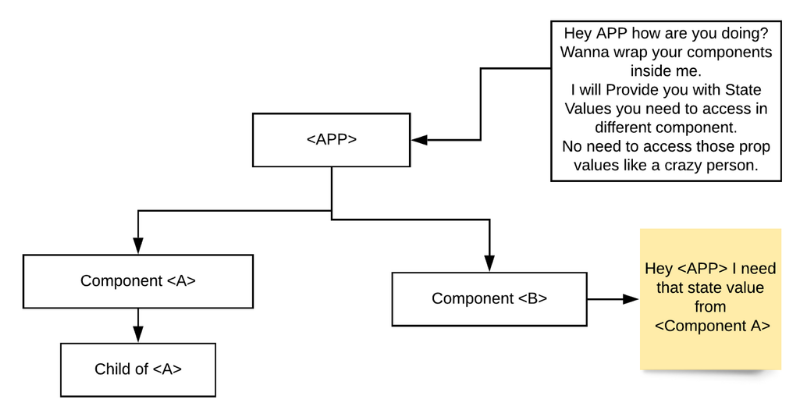
Let’s create our Context API
First and foremost, let’s set up our directory structure. Take any basic example that follows the above-mentioned problem.
Our directory structure will look something like the above flowchart.
Your Parent APP component should look something like this:
Step1: Create a Context.js file anywhere in your Component folder.
Add the below piece of code to your file. This will create a context named AppContext
Step 2: Next let’s create our Provider. The Provider is where we provide all our values to the components consuming the context.
Step 3: Wrap your Parent Component with the Provider:
Step 4: Now you can consume the context value anywhere down the AppProvider Component tree. By using the useContext hook:
Things to Remember while using Context
Conclusion
If you are from the redux world and haven't heard of Context API before. Visit /insights/coe/javascript/reacts-context-api-and-how-it-can-replace-redux to know more about Context API and how it can be a replacement over redux for small scale applications.
Hope this blog post was informative. Do send us your queries in the comment section below.