Up till now, we have seen what Acquia Site Studio is and its power-packed features. Here in this blog, we are going to talk about the configuration feature of this product. The nightmare for any developer is to make the replica of their local/dev/QA/UAT instance to prod, especially when it comes to the configuration. So, now let’s see how Acquia Site Studio is immensely powerful to handle this without any hassle and that too without any code conflict.
When we export Site Studio configuration it creates one single file [project-name].package.yml with all Site Studio's settings like base styles, colours, custom styles, fonts, settings, components, templates, custom styles, etc etc. and we push the file on GitHub. Since it’s been a single configuration file, there are more chances to get a conflict for another developer and if we are thinking about resolving conflicts errors manually then it’s more hectic work because generated file data is mostly in JSON values and not easy to resolve.
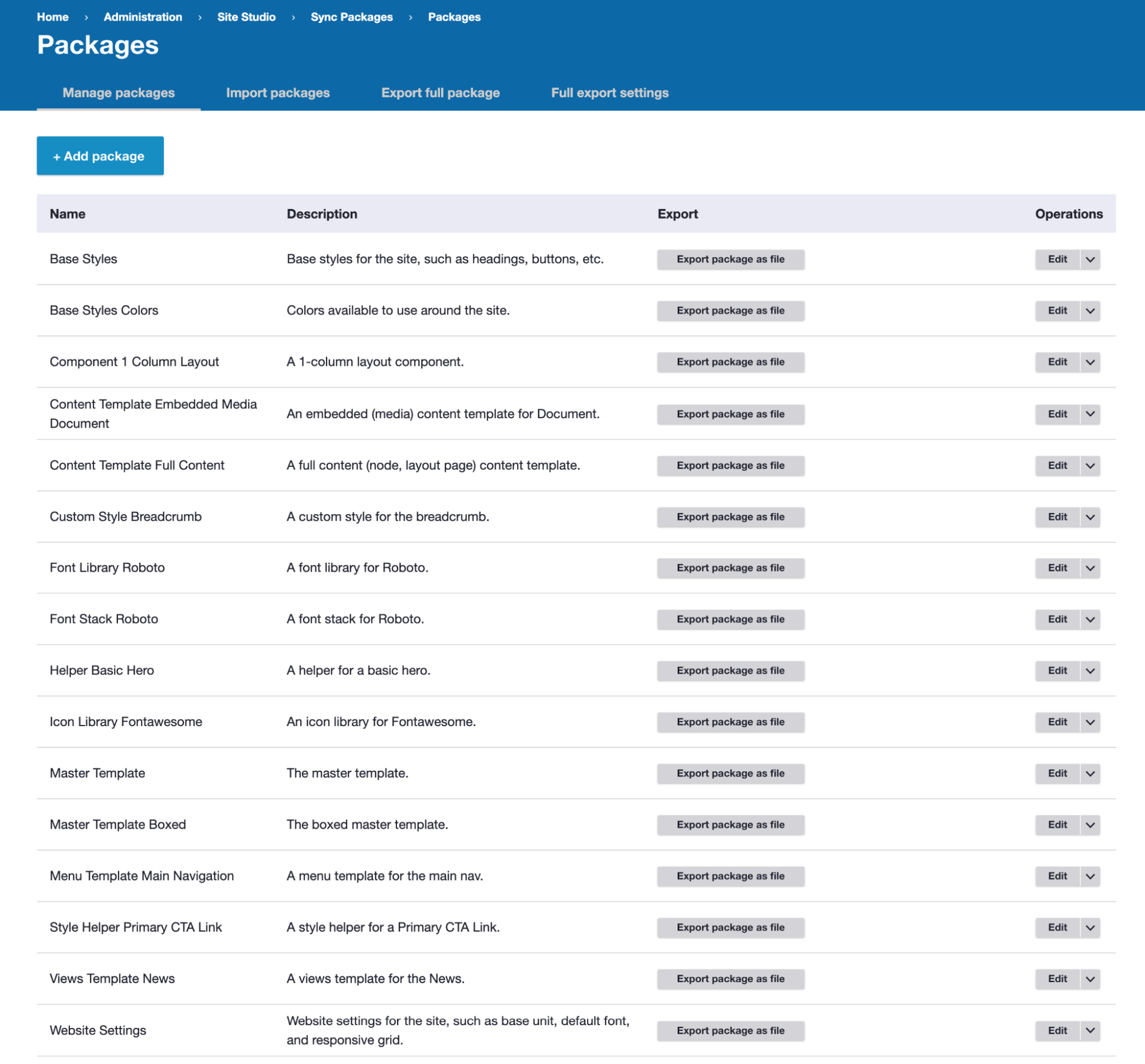
So to resolve this we have another approach to manage Site Studio configuration in a modular way. It will have a single file for each individual base styles, colours, custom styles, fonts, settings, components, templates, custom styles, etc. Let’s see how we should manage this Site Studio configuration.
Before development
Sync your project with the latest code base and database.
After development
Export your Site Studio packages to commit your changes. Create a new package or edit an existing package in the admin UI.
New package
Existing package
Site Studio item type naming convention
When you are exporting any base style, colours, custom styles, components, templates etc. that time select only that particular base style, colours, custom styles, components, templates and its related file because we are creating separate package files for every configuration.
In the below example, You can see only the Site header component is selected and its related files are selected.

This modular way of configuration management resolved the git merge conflict since there are separate files for each and every website settings, styles, components, helpers, templates, etc. etc. so there will be separate package files for each individual like the above naming convention and screenshot instead of one single file of all config.
More resources
Site Studio Drush commands
All available Drush commands can be found in Cohesion docs
Coding standards
General rules:
Base Styles
Only use base styles for Global selectors and any items you do not want to include a prefix of .coh-.
Custom Styles
All custom styles will get a prefix of .coh-. You can then add this markup to templates.
Templates
Keep styles inside a template if they won't be used elsewhere. This helps with maintainability and portability.