Drupal CMS offers a rich user interface and powerful content editing experience. There are a lot of contributed modules that enhance the system and its editing experience. One of the projects I was working with called for concurrent editing implementation. Concurrent editing simply means allowing multiple editors to edit the same content at the same time, without the possibility of conflicts arising due to concurrent actions.
In today’s editorial landscape, content creators can not only access a document countless times to revise and update content but also work with distributed teams. For this reason, concurrent editing has become among the most essential and commonly requested features for any content management solution.
The project (Layout Engine) involved configuring pages and blocks of a mobile application through Drupal.
A single page of a mobile application consists of multiple sections, these sections could contain data as per user’s locations or any other criteria. A page in Drupal was primarily a content type. We used paragraphs to configure blocks which we call widgets. So basically, a banner on the homepage of a mobile application is a widget.
These pages and widgets were configured by our client’s marketing team. Any page on the mobile app could consist of 'N' number of widgets. Due to a large number of widgets present, it was difficult for a single user to be familiar with all of them. Multiple members of the marketing team worked on the app simultaneously, making it difficult to edit the layouts/widgets.
Thus the client needed a system where multiple users could simultaneously edit the layouts and their widgets independently.
Collaborative editing has long existed as a concept outside the content management system (CMS). It is a limitation of Drupal at the moment, and we don’t see any solution for it in Drupal core soon. A big thanks to the members of the community who contribute their code in the form of modules making solutions available to the world in a quick google search.
We explored a couple of modules which fulfilled our requirements to some extent.
| Paragraph Frontend UI
This module provides quick editing of widgets on the view page itself.
A user won’t have to go to the edit page and then search for the widget to update and then save the whole node. He can do it quickly on the view screen. We believed this would allow multiple users to quickly edit the widgets and will solve the issues. But, it turned out that the module throws a deadlock error when multiple users are updating different paragraphs of the same node. Therefore, we discarded the possibility of using the Paragraph Frontend UI module.
The next module we explored was the Paragraph Edit module. It provides a separate page to edit the paragraphs through the contextual links. It does not break when multiple users attempt to edit different paragraphs simultaneously. But the issue with this approach was that it supported separate editing only. So if a user had to create a new paragraph/widget, he/she had to go to the edit node form. The tricky part here is, if an editor is on the node edit form while some other editor made changes through the quick link, the current form will contain the old data. In this case, when a user saves the node, it will revert those changes to the previous version. We did not want that either.
| Conflict
It does not have any additional configuration attached to it. I am adding two screenshots below to show how it works. This is what the second user will see when the first user has already saved the node and content is in the database. To know more visit - https://www.drupal.org/project/conflict

Once the user clicks on the 'resolve conflicts' button, it shows two versions of each field, something like in the following screenshot. Users have to manually update the field accordingly and need to save the content again.
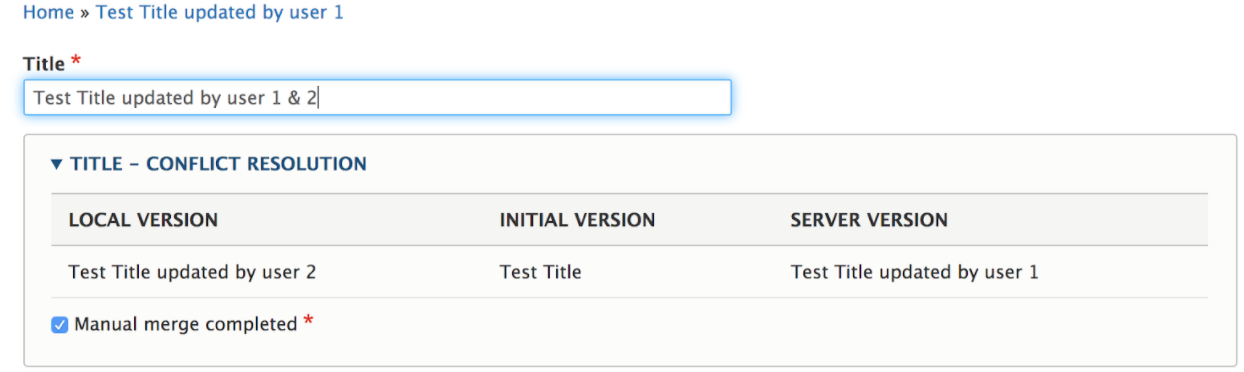
This module is a good solution under the following instances:
| Content Lock (anti-concurrent editing)
As the name suggests this module locks the content for the first editor who started to edit the content. Any other editor will see the message and all the fields will be disabled for him/her.
Features of Content Lock (anti-concurrent editing):
The content lock was used until we had a proper solution for concurrent editing.
After countless discussions with the marketing team, we decided to provide a solution to overcome the concurrent editing problem. We decoupled all the widget creation as a separate node and referred those nodes into the Layouts. This way, everybody had control on their own widgets and they did not need to wait for the content lock to end.
If you have implemented a better solution for concurrent editing, we would love to hear about it!