After more than a decade in QA architecture, I’ve seen firsthand how critical visual testing is to delivering high-quality web applications. In this blog, I’ll walk you through how to integrate Percy with Cypress, covering everything from the initial setup to advanced configuration
Why Percy with Cypress?
Visual testing ensures your UI remains pixel-perfect across different environments. Percy with Cypress offers:
Getting started
Step 1: Project setup
Create and navigate to the project directory
Commands
Initialise npm project
Commands
Install required dependencies
Commands
Step 2: Project structure
Create this folder structure:
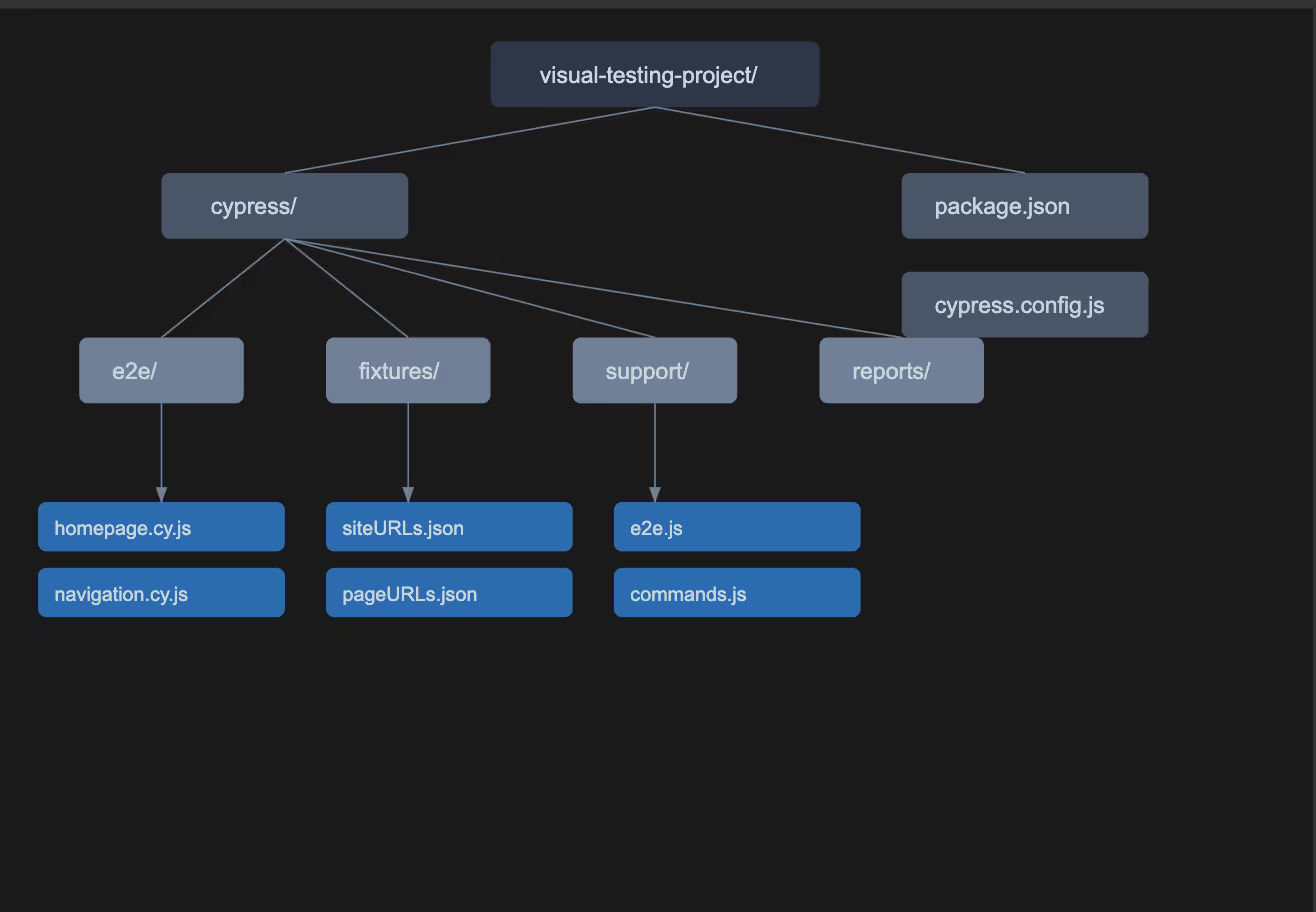
Step 3: Configuration Files
Syntax:
File : Cypress.cofig.js
Writing Your first test
Basic test structure
Here's a concise explanation of the test structure:
The visual test for the homepage is structured in a clear, hierarchical manner. Starting with a `describe` block that defines our test suite, we first ensure a clean testing environment using `beforeEach` to clear browser data. Within the test case (`it` block), we follow a logical sequence: first navigating to the page, then waiting for content to load, and finally capturing visual snapshots at different viewport sizes. This approach ensures consistent and reliable visual testing by addressing common challenges like page load timing and responsive design verification.
For example, when we write:
This single command captures the page's appearance across mobile, tablet, and desktop views, enabling us to verify our responsive design with one test. By using meaningful snapshot names and strategic viewport sizes, we create maintainable tests that provide valuable visual regression coverage.
Create file: cypress/e2e/percy/homepage.cy.js
Syntax:
Multi-environment testing
Environment configuration
Create file: cypress/fixtures/siteURLs.json
Multi-Environment Test
Advanced configuration
Custom commands
Create file: cypress/support/commands.js
Syntax:
Percy configuration options
Reports and screenshots
Percy screenshots
Local reports
Best practices
1. Environment variables
2. Authentication
3. Lazy loading
4. Dynamic content
Troubleshooting guide
Common issues
1. Missing screenshots
2. Authentication failed
3. Dynamic content issues
Remember:
Percy-Cypress component guide
1. Percy configuration options explained
Syntax:
Key options:
2. Custom commands explained
Syntax:
Use cases:
3. Multi-environment testing breakdown
Syntax:
4. Package.json script commands explained
Syntax:
5. CI/CD integration
Syntax:
6. Dynamic data management
Syntax:
7. Test maintenance tips
When selecting elements in Cypress tests, using dynamic selectors is crucial for test maintenance and reliability. Consider this approach:
This pattern creates resilient tests because data-testid attributes are specifically designed for testing and are less likely to change during UI updates or refactoring. Think of it like having a dedicated handle for testing purposes, rather than relying on IDs that might change for styling or JavaScript functionality.
1. Use dynamic selectors
When selecting elements in Cypress tests, using dynamic selectors is crucial for test maintenance and reliability. Consider this approach:
This pattern creates resilient tests because data-testid attributes are specifically designed for testing and are less likely to change during UI updates or refactoring. Think of it like having a dedicated handle for testing purposes, rather than relying on IDs that might change for styling or JavaScript functionality.
2. Handle environment variables
Environment variables allow for flexible configuration across different testing environments.
This setup lets you run the same tests against different environments (development, staging, production) without changing the test code. The config object acts as a central place for environment-specific values, making test maintenance and environment switching straightforward.
3. Create reusable test data
Having a structured approach to test data improves test readability and maintenance:
Conclusion
Using Percy with Cypress is a practical and efficient way to automate visual testing and catch UI issues early. It reduces manual effort, helps detect visual bugs before they reach production, and keeps the interface consistent across browsers, devices, and languages. Since it integrates smoothly with most CI/CD pipelines, it supports faster and more reliable releases.
To get the most out of this setup, it's important to follow a few best practices:
As applications grow, maintaining visual consistency becomes increasingly complex. This integration offers a clear advantage by surfacing visual changes directly in pull requests, making it easier for teams to catch regressions and collaborate more effectively.
In my view, Percy and Cypress together offer a dependable, scalable solution for teams that care about delivering a high-quality, visually consistent user experience.